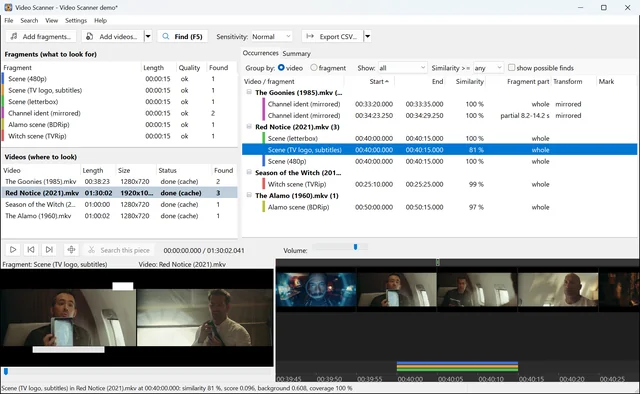
Bolide® Video Scanner answers one question: where does this piece of video appear in these files? Give it a short fragment — an intro, a commercial, a scene from a rough cut, a sponsor bumper — and the videos to search in. It lists every occurrence with its start and end time, how closely it matches and whether the whole fragment or only a part of it was found, and plays the fragment and the find side by side so you can check.
What it does
- Finds the fragment even when it was re-encoded. Different resolution, bitrate, codec, container, black bars, a TV logo or subtitles on top, a mirrored copy, PAL/NTSC speed change — the search compares the picture itself, not the file.
- Finds partial matches. If only the middle of your fragment was used, you see which part and where.
- Fast. A video is read once and all fragments are checked at the same time; decoding uses the graphics card (NVIDIA, AMD, Intel) together with all processor cores. Once a video has been indexed, every later search in it is practically instant.
- Checks itself. Two players side by side — the fragment and the find — run in sync from the same spot. A frame strip of the whole video shows where every find sits; select any piece of a video and search for it in the others.
- Reports. Mark finds as confirmed or false, see a fragment × video summary, export the list to CSV or copy it to the clipboard.
Who is it for?
- Video editors: find which source files a scene came from, where a stock clip or a B-roll shot was used across a project, which episodes share an intro or a recap.
- Broadcasters and ad agencies: verify that a commercial or a sponsor bumper actually aired, and when, in hours of recorded broadcast.
- Archives and media libraries: locate a known clip in a large collection, find reused footage.
- Rights holders: check whether your clip was inserted into someone else's video.
How it works
- Add fragments — the clips to look for (files, or a piece cut right from a video in the program).
- Add videos — files or whole folders to search in.
- Press Find. Bolide Video Scanner builds a compact visual fingerprint of every video (4 frames per second, 16×16 brightness grid) and looks for the fragment's fingerprint in it. The finds appear as the search goes.
The first scan takes time, the next ones do not. The first time you search in a set of videos, every file has to be read and fingerprinted — with a graphics card about a minute per hour of 1080p video, a few minutes per hour on the processor alone. The fingerprints are kept in an index on your disk, so every later search in the same videos — a new fragment, a different piece, the same folder next week — is practically instant: nothing is decoded again, only the files added since the last time.
Everything runs locally on your Windows PC. No video is uploaded anywhere; the program needs the Internet only to check for updates.
Free trial and license
Bolide Video Scanner will be free to download and try for 30 days with the same search quality as the full version. The trial searches up to 10 videos or 5 hours of video at a time and shows the finds on the screen; exporting them (CSV, copying, reports) needs a license.
A license — $59.95, one-time payment — removes all limits. All minor updates are free. Owners of Duplicate Video Search will get a discount.
Bolide Video Scanner and Duplicate Video Search
Duplicate Video Search compares whole videos to find duplicates and similar files. Bolide Video Scanner searches for a short fragment inside long videos — a different job, done with the same offline-first video fingerprinting approach by the same team.
Frequently asked questions
Which formats are supported?
Everything FFmpeg decodes: MP4, MKV, AVI, MOV, WMV, WebM, TS/M2TS, FLV, MPG, VOB and more; H.264, HEVC, VP8/VP9, AV1, MPEG-2/4 and other codecs. No extra codec packs are needed.
Does it find a clip that was cropped or zoomed?
Black bars and small differences in framing are handled. A strongly cropped or zoomed copy (for example a vertical 9:16 reel cut out of a 16:9 film) is not found in this version.
How fast is it?
The first scan of a file runs typically 50–100× faster than real time on the processor and several hundred times faster with a graphics card; a one-hour 1080p file is fingerprinted in about a minute. The result is kept in an index, so a repeat search in files that are already indexed takes seconds no matter how many hours of video they hold.
Does it need a GPU?
No. A graphics card speeds up decoding; without one the processor does the work.
System requirements
Windows 10 or 11, 64-bit. 4 GB RAM. Optional: an NVIDIA, AMD or Intel graphics card with video decoding for faster searches.
The interface is available in English, Russian, German, French and Spanish.
Bolide Video Scanner 1.0 for Windows is in final testing. Write to us to be notified when it is released.